Sunday, December 24, 2006

Let it snow...


Do you like a Christmas without snow? I think most people don't. Unfortunately, living in southern hemisphere, you have to accept this truth, unless you have escaped to northern hemisphere. Now, we can have a Christmas with snow on your desktop with a tiny software!
Look, my desktop is snowing!
Download the software from
http://www.mybloop.com/wenbin/snow.exe
and run it.
Enjoy ;).
Wish you a merry Christmas and all the best for the new year!

Monday, December 18, 2006

Nokia contact display issue

My housemate bought a Nokia cell phone yesterday. When he arrived home, all time were devoted to studying the new phone. Unfortunately, when he tested his messages, he found the phone cannot display the sender's name, though the number is stored in his SIM card. After fiddling with his phone for a long time, he asked me to send him a new message again.

Wow, my name was displayed. So he asked the first sender to send him the message again. Of course, the result remained the same. I do remember I have met this problem before. But it is hard to pick up the cause; it happened long time ago. Luckily, I figured it out.

This problem is caused by duplicate numbers. If you store the same phone number into more than one contact, Nokia phone will not display the contact in your address list.

Thursday, December 14, 2006

Free software 13: equation solver


I have to say, students today should not have any pain when working on their homework because of computer. Many softwares are designed to help you. Of course, you have to pay . ;) Futhermore, Internet is a really good source where you can find help. I do remember it was painful when I was a primary and a junior student. Endless equations were sitting on my little desk, and watching me struggling. These are some complaints to memory my student life (although I am still a student now).

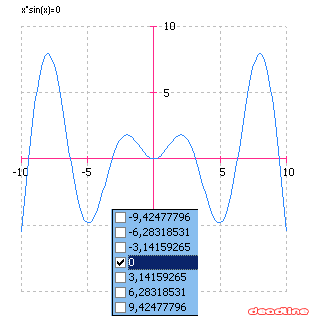
Today's leading actor is Deadline, a powerful equation solver. In its website, it says you can do the following with it:


  1. solve equations

  2. plot graphs interactively

  3. perform calculations

  4. derive functions and evaluate derivatives

  5. solve optimization problems: find local extrema

  6. integrate functions numerically

  7. solve parametric equations

  8. obtain an in-depth analysis of a function

  9. save results: equations, graphs, roots and extrema

  10. solve Calculus assignments in your own language

I tried it and recommend it to students who are not good at maths ;). The official website is http://deadline.3x.ro/, where the picture in this article comes.

Wednesday, December 13, 2006

Free software 12: Family tree


In fact, I tested two softwares for genealogy or family tree long time ago, but just too lazy to write down;). Last Sunday, I found the price of a family tree software was $99, so I decided to recommend the free family tree makers as soon as possible.

The first one is GenealogyJ, which is a open source software, (of course, it is free.) It is written in Java. You can create family tree, table, timeline and more. Unluckily, it is designed for letters only. If you store information with East Asia characters, although it can display when you type in, you cannot read them from the stored file. So, if you prefer to East Asia characters rather than English to store your genealogy, please go to software 2 ;P .

The second software is OhmiGene,available in French and English. The Data are saved with UTF8.

I am not going to judge which software is better, just try it, and find which one is your favourate. The official websites are: http://genj.sourceforge.net/wiki/doku.php and http://ohmi.celeonet.fr/ohmiGene/index.fr.html.

(The photo in this article is from http://ohmi.celeonet.fr/ohmiGene/index.fr.html)

Friday, December 08, 2006

MATLAB: find the maximum in a matrix

Given a matrix a,
a =
    81    91    27    96    95
    90    63    54    15    48
    12     9    95    97    80

now we want to locate the maximum value 97. There are several approaches.

  • Use max only.
>> [row_val row_ind] =max(a, [], 1)
row_val =
    90    91    95    97    95
row_ind =
     2     1     3     3     1
>> [col_val col_ind] =max(row_val)
col_val =
    97
col_ind =
     4
The maximum value is at [row_ind(col_ind), col_ind]
  • Use find.
>> [r c] =find(a==max(a(:)))
r =
     3
c =
     4
  • Use single index.
>> [s_v s_i] =max(a(:))
s_v =
    97
s_i =
    12
>> [r c] =ind2sub(size(a), s_i)
r =
     3
c =
     4

*******************************************

Usually, to find the maximum value of a matirx, the following command is used:

max(a(:)) where a is a 2D matrix

The problem is that if the matrix size is too big, you may get yourself involved in a problem that is ??? Matrix is too large to convert to linear index. This is caused by a(:).

Try to use max(max(a)) instead.

Monday, December 04, 2006

Error 1324: The Folder Path Contains an Invalid Character

It is quite annoying to meet the following error when installing a software:

Error 1324: The Folder Path Contains an Invalid Character.

This problem is described at http://consumer.installshield.com/kb.asp?id=Q108470 and Microsoft gives out a solution at http://support.microsoft.com/?scid=kb%3Ben-us%3B292582&x=9&y=11. However, it may not help.

At http://support.installshield.com/kb/view.asp?articleid=q107602, the possible causes are demonstrated:

  1. The path specified in the error message points to a hard-coded path (i.e., C:\TestFolder), rather than a system folder (i.e., [WindowsVolume]).
  2. The path specified in the error message and contained in the Directory table contains an invalid character, such as <, >, /, \, :, *, ?, , ", or null.
  3. A path containing multiple levels, such as C:\Test\MyFolder, is being referenced directly in a single Directory table entry. Each level should have a unique entry in this table; referencing multiple levels in a single entry causes this error.
  4. Duplicate entries exist in the Directory table or a particular directory (i.e., SHELL_OBJECT_FOLDER) has multiple entries within the table.
  5. A file being referenced by the setup may have an invalid link. The file may have been moved or deleted since it was inserted into the project, thereby causing this error at run time.
  6. The system settings are incorrect on the target machine. For example, this issue has been known to occur on an English setup when the regional settings were set to Simple Chinese.
So if it is caused by F, just change your system settings then install the software.